
It’s 2026 and TEFL teachers have mastered classroom favourites like Kahoot! and Quizlet. Enter AI — supercharging our favourite teaching tools and introducing plenty more.
AI has brought about massive change, and it needs no introduction. When ChatGPT arrived on the scene in 2022, it made serious waves in the educational landscape, revolutionising the way we teach. Our teacher toolkit has grown — hooray!
Teachers are busy people, and they are singing a different tune: Work Smarter, Not Harder is the unofficial 2026 TEFL teacher anthem.
Say goodbye to late-night lesson planning and fashioning flashcards from cardboard. We are turning AI bots into our very own personalised teaching assistants.
With so many tried-and-tested digital tools, and emerging ones, the toolkit is large and ever-expanding! We’ll guide you through the digital wilderness by recommending the educational tools we think will make all the difference.
Let’s enter the exciting world of educational technology to see how you can reclaim your weekends.
Best AI tools for automated lesson planning and admin
Below are a few essential digital tools for teaching and learning that will help you save time on one of the biggest time thieves: lesson planning.
ChatGPT
We kick off with the ultimate crowdpleaser. If you STILL haven’t made your way onto ChatGPT, you’re missing out big time. In 2026, it’s not just another AI; it’s a cheeky collaborator brimming with ideas, with a useful voice feature to boot.
ChatGPT is great for:
- Lesson ideas & activities: From 5-minute warm-ups to full thematic units
- Storytelling: Personalised reading passages based on student interests
- Adapting lessons: Instantly levelling a text (eg, turning a C1 news article into a B1 reading task)
- Rubrics: Assessment rubrics tailored to specific EFL levels
- Quality checking: Reliable spelling and grammar checks
💡Tip: Specify your preferred version of English: UK, US, etc.
To make the best use of ChatGPT, you’ll have to do some prompt engineering — magic words that get you the results you are seeking.
Example prompt: You are an expert TEFL materials designer. Create a B1 grammar activity on conditionals based on a transcript of a popular travel vlog. Include a guided discovery section and a final role play.
You can visit the site and start chatting instantly: no account, no sign-in. Of course, an actual account keeps track of your chats, remembers your preferences and teaching style.
Twee
Unlike many general education tools, Twee is designed specifically for the world of TEFL. It can turn your favourite YouTube content into full-length EFL lesson plans without slogging through transcripts or writing comprehension questions from scratch.
And if the text is too hard for your students? Twee will simplify it to your chosen CEFR level. That means you can use the same lesson across multiple classes, from A1 right through to C2!
Twee isn’t limited to video either. It also works with user input such as topics, PDFs, and vocabulary lists, generating CEFR-aligned lesson plans, quizzes, and customisable exercises in seconds.
You don’t need to sign up to use it, but an account lets you save and organise your lesson plans. Students don’t need accounts to complete exercises.
NotebookLM
NotebookLM is your AI assistant on steroids. It transforms uploaded content such as documents, videos, and web links into quizzes, flashcards, and mindmaps, turning long texts into engaging lessons in a jiffy. You can even use rough handwritten notes and let it work its magic!
Its podcast feature lets teachers create audio overviews for students to listen and learn on the go — perfect for summarising articles, policy documents, or lesson content.
NotebookLM supports up to 50 sources per notebook, collaborative sharing, and user-controlled privacy, making it perfect for research-driven lesson planning. All outputs are based on what you upload, so no need to worry about AI hallucinations.
Other useful features for TEFL teachers include:
- Expandable mindmaps to visualise complex topics such as grammar structures or global teaching markets
- Quizzes with explanations
- Flashcards for spaced repetition
- An interactive Studio panel for generating materials directly from videos, PDFs, or web links
Teachers need an account to upload content, save notebooks, and share with colleagues. Students don’t need accounts unless they are contributing content themselves.
🔥Hot career tip: Showcasing your skills with tools like ChatGPT, Twee, and NotebookLM shows that you can produce high-quality CEFR-aligned work fast without burning out. Make it your unique selling point in upcoming interviews to show how tech-savvy, efficient and future-proof you are.
Read more: TEFL Interview Tips: What Recruiters Want to See
Best AI game-based review tools
The following tools for educators share the same DNA: recall, review, motivation, and competition.
Kahoot!
This gamified quiz platform remains an evergreen favourite in 2026. It energises the classroom and enhances engagement with quizzes, polls, and interactive games, letting teachers turn vocabulary, grammar, and comprehension practice into friendly competition — something students love!
It also provides real-time feedback, making it an effective assessment tool for teachers. Learners can see what they know and what needs more attention, while helping teachers track progress effortlessly. Plus, it works just as well for in-person or virtual classrooms, making it a versatile tool for any TEFL setting.
Create a free or paid account and start creating quizzes from scratch or using a template. Students join using access codes.
Quizlet
For TEFL teachers, this tool is a game-changer. It lets teachers and students create custom flashcards, quizzes, and matching games, turning vocabulary and grammar practice into an interactive and enjoyable experience.
It has a huge resource library, so students are bound to find materials on their study topics. Its collaborative features let students partner up with a study buddy for shared practice, while personalised review sessions keep students motivated and help them retain language skills more effectively.
Teachers sign up to create or access shared study sets. Students can access sets without accounts, but accounts allow tracking progress.
Blooket
Blooket has become a popular tool for teaching in the TEFL classroom, and it’s free! Teachers can create their own question sets or use pre-made ones covering grammar, vocabulary, and reading comprehension.
Its gamification platform turns vocabulary review from drab exercises to competitive games with a variety of game formats to cater to different learning styles and energy levels — perfect for high-energy competition mode or solo study sessions.
Similar to Kahoot, it identifies which concepts students are struggling with through live game reports. And it’s not just for Young Learners. Adult students enjoy climbing the leaderboard while practising their English too.
Teachers sign up to create or manage question sets. Students join games via a code, with no account required.
LingoClip
Have you ever wasted time scrolling through YouTube in search of the perfect music video to do your gap fill exercises? LingoClip (AKA LyricsTraining) solves that problem for you.
It’s designed to locate music videos at the right level for your students and ensures that it’s CEFR aligned. It literally takes music videos and transforms them into beloved fill-in-the-missing-lyrics activities, and the chosen gaps target specific grammar points. That’s half your work done!
Search by artist, song title, genre, or language level to create listening, vocabulary, and pronunciation practice. Students can then work through the exercises in gamified modes (typing, multiple choice, using bilingual dictionaries) and track their progress with stats and leaderboards.
Teachers can sign up for free to manage classes and track student progress. Students can access free content without an account, but are limited to three songs a day. For unlimited access, opt for the premium plan.
Best AI live engagement tools
Here are some of the most effective tools teachers use in the classroom in modern TEFL settings for live polling, formative assessment and group brainstorming.
Mentimeter
Navigate to the Mentimeter website, and you’ll be greeted by their slogan: Listen, learn, and think. Together.
It’s true! The platform lets teachers create live polls, quizzes, word clouds, and Q&A slides that turn lessons into interactive, collaborative experiences.
Mentimeter is super easy to use in the classroom. Students simply scan a QR code to participate — no logging in, no downloading. That’s minutes (and headaches) saved for the teacher.
It’s also a quick and easy way to read the room and let your students share their thoughts anonymously.
So how do you use it? You can:
- Brainstorm vocabulary
- Check prior knowledge
- Get honest feedback
Mentimeter’s cloud feature provides an engaging visual snapshot of your students’ thoughts for all to see. Let’s say you ask how everyone’s feeling. Students will enter their answers using their devices, and their answers grow the cloud, with frequently submitted answers appearing larger. It’s a great warm-up activity.
Teachers need an account to create polls, quizzes, and slides. Students participate using a code.
🔥Hot career tip: Using Mentimeter shows that you know how to manage group dynamics, a skill that sets you apart when applying for jobs at top-tier language schools.
Nearpod
This nifty app makes interactive lessons a breeze. This slide-based platform lets you push content directly to your students’ devices: when you move a slide, their screen moves too. That makes it great for synchronous learning.
A single presentation can include a variety of elements, from 3D objects and virtual field trips to gamified quizzes.
Students can exercise their creativity by using Nearpod’s Draw It feature. Teachers can provide instructions, and students can draw the solution. The teacher dashboard lets teachers check whether students understand the concept. This is particularly useful for rowdy classes — it gets everyone involved and focused without the need to shout out answers.
The beauty of Nearpod is its huge library of pre-made lessons, which is a lifesaver in a time crunch. You can search by CEFR level (B1) and topic (the present perfect) and find a fully-crafted lesson created by another teacher.
Nearpod relies on user ratings, favourites, and teacher reviews, so make sure to preview materials before use to ensure it meets your needs.
Teachers sign up to create or push interactive lessons. Students join using a code, but accounts allow progress tracking and assignments (ie, interactive lessons assigned for students to complete asynchronously).
🔥Hot career tip: Mastering Nearpod shows you can handle hybrid teaching with technical confidence.
Edpuzzle
Edpuzzle turns passive watching into an active task. It allows you to take any video, even your own recordings, and embed questions directly into the timeline. The video pauses until the student answers the question.
It’s a great way to assign homework or for use in a flipped classroom (students review content at home and practice in class). It streamlines your lessons since students arrive at class fully prepped on the vocabulary or target language.
Teachers can use the AI Question Generator, so no need to scratch your head when you run out of questions or hit a blank. Simply paste a video link, and Edpuzzle will insert pauses at the right moments to check for understanding.
In 2026, students are used to short-form content. Leverage this by using Edpuzzle to crop long videos down to keep student engagement high.
Teachers need an account to embed questions and track responses. Students can answer videos without signing up.
Interactive lesson and content creation
If you’re seeking more ways to create interactive lessons, the following digital tools in education will help you design visually appealing content and immersive learning experiences.
Genially
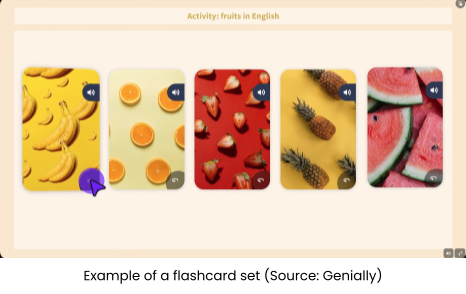
Genially is a design platform that turns lessons into a mini adventure. It lets you create click-to-explore boards, interactive infographics, and digital escape rooms.
Genially’s AI Quiz Generator builds multi-page interactive quizzes with animations and sound effects using your descriptions.
It has:
- An online flashcard & flip card maker
- Authoring tool — build courses without coding knowledge
Best for:
- Escape rooms and quests: Turning a boring grammar review into a mission where students have to unlock codes to move to the next slide. Simply grab a ready-made template from the Gamification tab, swap in your own vocabulary/text, and deploy instantly.
- Interactive images: Take a photo of a busy street or a kitchen and add hotspots that play audio or show vocabulary words when clicked.
- Self-paced learning: Because it’s so visual and easy to navigate, it’s perfect for students to explore on their own.
Teachers sign up to create interactive lessons and share them with students. Free accounts allow basic publishing; premium accounts add more features such as additional templates and dashboard analytics for tracking student engagement and time spent.
🔥Hot career tip: Using Genially shows that you’re able to use tech to create experiential learning.
AI-powered speaking partners for fluency and pronunciation
It’s not always easy to spot the best education tools to give students personalised speaking practice both inside and outside the classroom. The following digital tools do just that.
ELSA Speak
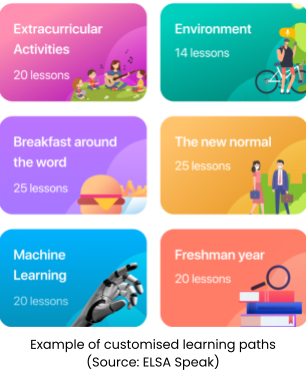
ELSA Speak transforms pronunciation practice into a low-stakes, interactive experience, giving students an AI conversation partner that chats away tirelessly, never judges, and adapts to their specific errors.
Benefits:
- Highlights problem sounds and provides targeted feedback using speech recognition
- Personalises practice by adapting to each student’s accent and error patterns
- Gamified progress tracking keeps students motivated
- Delivers intensive one-on-one speaking practice — a huge benefit in large classrooms
TEFL teachers can use ELSA to assign homework or independent study. The paid version adds AI conversation partners who can chat on a range of topics while still monitoring pronunciation.
💡Classroom hack: Use the paid AI Conversation Partner feature to assign a topic (eg, ordering a coffee) and have students record their chat. The app will generate a report on their pronunciation and accuracy, so you can track progress without sitting through multiple role-plays.
A free account lets teachers assign exercises, but a paid version adds AI conversation partners, which is what you want. Student accounts are free and include access to exercises.
Gliglish
While ELSA Speak focuses on pronunciation and accent, Gliglish focuses on fluency through low-pressure speaking practice. Gliglish lets students speak in their home language when they get stuck, and AI translates on the spot. This makes it brilliant for anxious or low-level learners who need a boost of confidence.
Gliglish chats about everything: travel, work, or hobbies. It prepares students for real-world interactions.
💡Classroom hack: Assign a specific conversation topic for homework (eg, discuss your weekend plans). Have students practise with Gliglish for 10 to 15 minutes, then come to class ready to role-play the same scenario with a partner.
Teachers can set up class accounts to assign topics and monitor progress. Students create accounts to use the app and interact with AI.
Best virtual whiteboards and hybrid classroom hubs
These online teaching tools make teacher-student collaboration and hybrid learning a breeze.
Explain Everything
More than just a basic drawing app, Explain Everything is a complete animation and collaboration studio. It’s your pocket-sized classroom whiteboard that records your voice, plays videos, and lets multiple students draw on it from their desks.
How to use:
- Infinite canvas: Zoom out to see your whole lesson plan or zoom in to focus on a single word
- Live collaboration: Invite students to join your board using a code and move objects, add sticky notes, or highlight text in real-time
- Creating explainer videos: Use the Record button to create videos while drawing and talking — the app turns your lesson into a professional-looking, shareable video
The app comes with a learning curve. Get around this by first using it as a basic whiteboard, then slowly introducing the recording and collaboration features as you grow in confidence.
💡Tip: Use the Web Browser tool to pull a website onto your whiteboard — mark it up or circle key vocabulary without switching tabs.
Teachers sign up to create and manage boards, record lessons, and invite students. Students join via shared code; no signup is required unless contributing content.
Koala Go
Koala Go is an interactive online classroom designed for Young Learners. It’s a 3D virtual classroom that works much like a video game, providing an immersive learning experience that boosts student engagement, since learning feels like play!
You can design a custom classroom or choose a pre-made, customisable template from the Koala Go Marketplace. Both teachers and students use avatars to walk, jump and explore the virtual world.
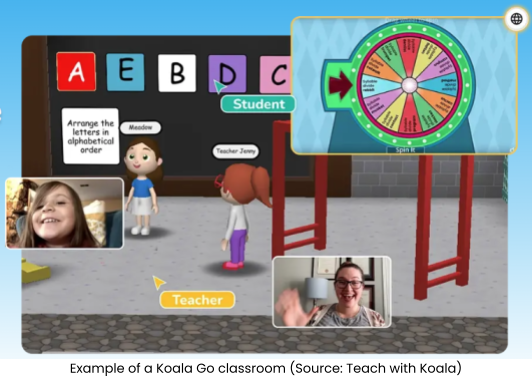
A nice feature is the Co-browse, which lets teachers open videos, websites or digital textbooks directly inside the 3D classroom without switching tabs, minimising distractions.
🔥Hot career tip: Pivot to specialising in online Young Learner education with Koala Go. Charge premium rates and boost your income as a private tutor by offering 3D adventures.
Read more: How to Get Started Teaching English Online
Conclusion
The digital wilderness is huge, but the tech tools discussed show us that you can make it out alive with just the basic survival tech skills. Adding these tools to your teacher toolkit will increase your digital savviness and help you reclaim your weekends, ultimately benefiting your students.
Remember, technology is a wonderful teaching assistant, but it’s not a replacement for human connection. So maintain that human touch by celebrating small wins, offering empathy, adding authenticity and local flavour that only a human teacher can bring to the classroom.
In the tech world, the mantra is “fail fast, fail often,” so don’t be scared to experiment with new tools. Keep exploring and learning, one digital tool at a time.
Happy teaching!